
UpCentral Toll-Free Number Messaging Guide
What is Toll-Free Number Verification?
Toll-free number (TFN) verification is a mandatory process that ensures your text messaging traffic is whitelisted with the toll-free messaging aggregator. This helps reduce false-positive blocks and ensures message deliverability. Without verification, message delivery will be blocked.
Verification Process:
- Submit Verification Form:- From UpCentral dashboard, click on Verify Toll-Free Number- Verify your business and contact information and enter your website url. Next enter your business location. Fill out the remaining form with the following details:
- Estimate Monthly Volume:- Select the estimated number of messages you expect to send per month. Be realistic and choose a number that reflects your actual usage to avoid issues with verification.- Opt-in Type:- Choose the method through which recipients have opted to receive your messages.- Use Case Categories:- Specify the categories that describe the purpose of your messages.- Opt-in Workflow Image URLs:- Provide URLs for images that demonstrate your opt-in process.- Describe how users provide consent to receive messages.- Provide URLs or screenshots showing the opt-in process.- Ensure the opt-in is clear, conspicuous, and not a condition of service.- Privacy Policy: Link to a privacy policy that explains how user data is collected and used.- Approved Examples: An embedded form on the end-business’s website that prompts end-users to enter their mobile handset phone number and opt into the texting campaign.
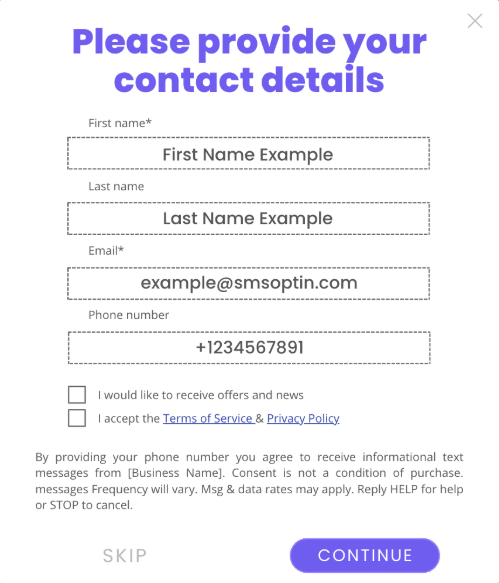
- Use Case Description:- Describe the context and content of the messages you plan to send.- Approved Examples: This number is used to send out promotional offers and coupons to the customers of for example the John’s Coffee ShopThe more detail the better for the use case/summary!
- Rejected Examples: MarketingThe rejected example message doesn't specify for what type of marketing the number is used for or what will the end-user/mobile handset be receiving from the end-user business.
- Message Content:- Include 1-3 variations of the messages you intend to send.- Approved Examples: “Thank you for being a loyal customer of John’s Coffee Shop. Enjoy 10% off your next purchase. Reply STOP to opt out.”This should be a sample message of the content that the end-user/mobile handset will be receiving in the SMS.
- Rejected Examples: “Your appointment is today at 10:00 AM”The sample message content should match the use case provided i.e., Marketing.
- E-mail for Notifications:- Enter an email address to receive status updates on the verification process.- Additional Information (Optional):- Provide any extra details that may support your verification request such as privacy policies, AUPs, additional onboarding controls you have, links, etc..Approved Examples: http://www.johnscoffeeshop.com/privacypolicy
- Agreement:- Agree to the terms and conditions, certifying the legitimacy of your traffic.- Submit:- Click "Send information for verification" to complete the process.
Key Points:
- Verification Time: Usually takes 3 business days, but can take up to 5 weeks.- Prohibited Campaigns: High-risk financial services, get-rich-quick schemes, illegal substances, deceptive marketing, etc.
Frequently Asked Questions:
- Status Check: Receive email updates on verification status.- Failed Verification: If verification fails, you cannot send messages to North America; resubmission might be possible .- Delivery Issues: Contact support if you experience issues after verification.By following these steps, you can ensure your toll-free messaging traffic is verified and compliant with industry standards, leading to improved message deliverability and reduced risk of blocks.